


✨Upgrade Your Storage in Seconds – 10Gbps M.2 SSD Enclosure
✨Upgrade Your Storage in Seconds – 10Gbps M.2 SSD Enclosure
Impossible de charger la disponibilité du service de retrait
-
Ordered
- - -
Order Ready
- - -
Delivered

✨Upgrade Your Storage in Seconds – 10Gbps M.2 SSD Enclosure
10Gbps
Blazing Fast
Turn an M.2 SSD into a fast, portable external drive for file backups, video projects, work documents and everyday storage.

Built for Fast Storage Without the Hassle
A clean, tool-free SSD enclosure designed for speed, heat control, broad device compatibility and daily portability.
Move large files quickly with USB 3.1 speed.
Works with supported M.2 SSD protocols.
Open, insert and slide closed in seconds.
Connect to USB-C and USB-A devices.
Cooler Performance for Heavy File Work
The aluminum alloy body and ventilation structure help manage heat, so your SSD can stay more stable during transfers, backups and creative workflows.
- Aluminum alloy shell helps draw heat away.
- Ventilation design supports smoother airflow.
- Ideal for videos, photos, games and work files.

Plug In Across Your Everyday Devices
Use it with laptops, desktops, tablets, compatible phones and more. No complicated setup—just connect, access and work.
- Compatible with Windows, macOS, Linux and Android.
- USB-C and USB-A cable options included.
- Great for home office, travel and mobile workflows.


Dual Protocol. More Choice.
Supports both M.2 NVMe and M.2 SATA SSD options, helping reduce compatibility worries before installation.

Two Cables. Less Friction.
Connect to modern USB-C devices or standard USB-A ports without hunting for an extra adapter.
Tool-Free Setup in 3 Simple Steps
No screwdriver. No tiny screws. No complicated assembly. Press, insert your SSD, slide closed—and you are ready to transfer.
- Beginner-friendly installation.
- Hot-swappable for faster daily use.
- LED indicator shows working status at a glance.

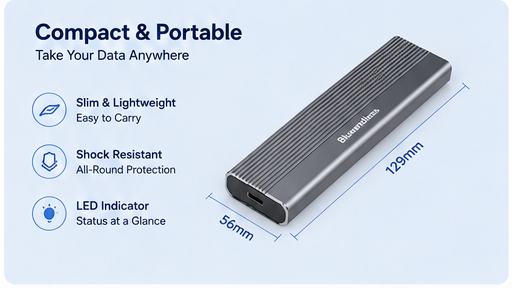
Slim Enough to Travel. Strong Enough for Daily Use.
Compact, lightweight and easy to store in a laptop bag, desk drawer or travel pouch—perfect for taking important data anywhere.
- Only 129mm long for easy carry.
- Shock-resistant all-around protection.
- Clean metal finish for a premium tech feel.

Key Specs at a Glance
Clear details help customers confirm fit before buying and reduce after-sale questions.
Questions Customers Ask Before Buying
Short, trust-building answers placed near the bottom help remove hesitation before checkout.
Does it work with both NVMe and SATA SSDs?
Yes. It is designed for supported M.2 NVMe and M.2 SATA SSDs. Please check your SSD key type before purchase.
Do I need tools to install the SSD?
No. The enclosure uses a tool-free design: open the case, insert the SSD, then slide it closed.
Will I get the full 10Gbps speed?
10Gbps is the theoretical maximum. Actual speed depends on your SSD, device port, cable and file size.
Which devices can I connect it to?
It can connect to compatible Windows, macOS, Linux and Android devices through USB-C or USB-A ports.
Upgrade Your Storage in Seconds
Fast transfer, better heat control, tool-free setup and two cable options—everything you need in one compact SSD enclosure.
Shop Now

Why Shop With Us

Why Shop With Us
Quality products, fair prices, and support that actually cares.
🚚 Shipping & Tracking
🚚 Shipping & Tracking
- Worldwide shipping with insured parcels.
- Tracking number is emailed as soon as your order ships.
- You may receive your items earlier depending on the route and carrier.
Heads-up: holidays, customs, or weather may impact delivery timelines.
🔒 100% Risk-Free Purchase
🔒 100% Risk-Free Purchase
If your item arrives damaged or not as described, just contact us for a replacement or refund—simple and hassle-free.
🏢 Our Warehouse & Processing
🏢 Our Warehouse & Processing
Please allow for processing time and consider holidays or unforeseen events that may affect shipping.
🎁 Free Shipping Threshold
🎁 Free Shipping Threshold
EnjoyFREE standard shipping on orders $49.99


Funciona perfectamente y se siente la calidad


Easy to install an m2 sata6 ssd300 MBs speeds on MacBook.USB-A USB-C combo cable is good.Use with 256GB sata m2 drive in my tesla.

I am using this enclosure to hold a ssd that I removed an old laptop that I friend had and no longer wanted. The enclosure is very easy to use and has a cable included with it that has both a usb and usb-c end. The only issue I found with this item was the rubber hold downs that are used to hold the drive down in the case. Instead of a rubber gromet, that could have included a small screw which would have been easier to use than the rubber gromet. Uther than that, the enclosure works great and is a good value for the money.
Excelente producto, funciona muy bien, no pesa mucho y es fácil de instalar
Item arrived in perfect condition and on time. It was easy to put the drive in. It functions perfectly and is quick. Also remember to use the fastest usb port you have with this to realize the speed of this enclosure. It is plug and play on Windows 11. Then to remove from your computer, use the Safely Remove hardware in your system tray so you dont have any errors. It is also slim and compact.
Good instructions. Did the trick.
Me ha servido de mucho para mí trabajo
Quiet, efficient, easy to install ! Ive never used the ORICO products before so I wasn't sure what to expect. To my suprise it DOES work with the SATA type SSD's very well! I needed more storage on my RPi 4B, This did the trick. I did all my formatting, plugged it in and BAM! worked PERFECT!? Compact and looks kinda cool. I liked so much I bought another for my RPi 5. (It also works with The M.2 NVMe SSD).Thanks ORICO 😎👍
The quality is great! Verry durable and easy to use! It dissipates heat really well and is compatible with pretty much anything.
I recently had a motherboard die, and I wanted to copy all of the files from that computer to another. I didn't have another computer with a open slot for this type of drive, so this was a necessity to save my data. The design is small and unobtrusive, and the metal case seems durable. The design is good at radiating any heat. I got very high throughput from my old SSD when I placed it in this enclosure, and installing and SSD is as simple as opening the case and sliding it in. I hope that I don't need to use it again, but I'm glad that I have it.
A well done product, I used it to upgrade the SSD hard drive of my PC, I placed the new and bigger SSD on the enclosure and I downloaded Windos 11 on it, then, I copied my files from the old hard drive into it. Replaced the old hard drive in the PC with the new one and finally, I placed the old SSD hard drive in this enclosure, re-formatted it, and now I use it as an external hard drive. Highly recommended.
Overall it works goodHowever for some reason the usb c to use c cable it comes with doesn’t work most of the time and is a bit oddBut the usb c to usb a works fine every timeAnd so do my other 3rd party cables that have high transfer speedIt uses small rubber studs to hold the nvme in which was a bit annoying but was still manageableAlso might not be needed as the metal top uses a screw and is t much wiggle room so I think it be fine either way
I have bought 3 of these, and all of them have worked perfectly as an easy way to reuse upgraded m.2 drives for portable storage. There are faster options out there, but they cost significantly more, and ports faster than 10gbs aren't very common yet anyways. For the price, and the fact that it has a heat sink and comes with a thermal pad, this is currently my go-to for this type of use case. The cover also lifts up rather than sliding, which means the thermal pad doesn't get ruined if you need to swap sticks. My only complaint is that it has torx instead of philips, but it does come with a torx driver which is nice. The rubber stand for the drive is also kind of annoying to place, but once its in there, that's not an issue unless you want to move it for a smaller form factor.
Some similar products have jmicron chipsets that dont really work well with Linux. These have realtek chipsets and they seem to work just fine. This is not really a replacement for internal nvm, but for data recovery and extremely high capacity flash drive use they should work just fine (speed is limited to usb speeds so you're gonna take a hit there, you're not going to use the nvm to its fullest extent.). Heat dissipation is really good due to the aluminum casing, comes with its own screwdriver and two usb cables, and just works.This thing is recommending I comment on its brightness and fit. Well, the card fits in (and installs very easily admittedly), and it's not very bright. I'm not sure what that has to do with anything? But portableness, ok. It fits in a pocket and I doubt it'll come to any harm there...
Alright, so I can do math; I know that 10Gbps is 1.25GBps. NVMe drives can far surpass that, so essentially, the bottleneck here is the USB port itself. That doesn't explain why, when I try three different USB-C cables (two USB-C to USB-C, one USB-C to USB-A), that the speed mysteriously plummets to 43MBps in my synthetic benchmark, gnome-disks. Meanwhile, when I use the provided cable, it ever so mysteriously happens to hit 1GBps for my PCIe 3.0 NVMe SSD, and 550MBps for my SATA NVMe SSD. It has nothing to do with cable length, as I ran it both directly into the motherboard and through a three foot long USB-C extension cable.I suspect that there's a chip embedded in the cable itself. The reason why I suspect this is that the cable end is about an inch long, and that's about the same length as my Adafruit USB-C to barrel jack cable that I use to power 12V devices through a USB PD power supply. I'm not willing to tear mine down without having a replacement, but there's no other way that three other (known good) cables would have speeds plummet.Outside of the issue with installing the rubber stopper (I really would've rather screwed into a standoff), it does work great, provided you use their cable. If you don't, it ever so conveniently gets kneecapped speed wise. Somewhat unfortunate especially since the provided cable is only about a foot long, but I can still use it with an extension cable.